> ## Documentation Index
> Fetch the complete documentation index at: https://docs.autype.com/llms.txt
> Use this file to discover all available pages before exploring further.
# Citations Panel
> Import and manage bibliography sources — add citations from BibTeX, DOI, or manually, and insert them into your document.
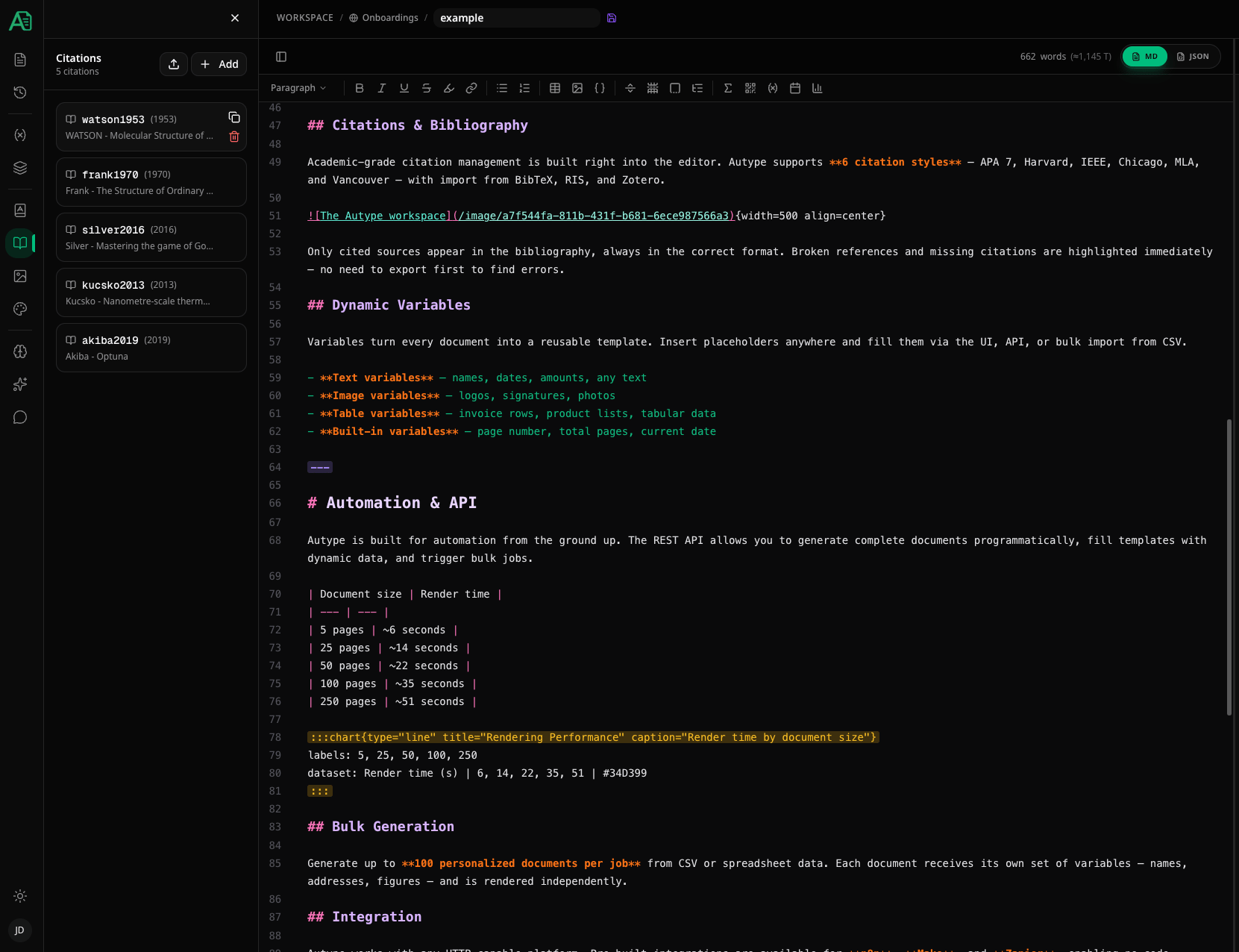
The **Citations** panel lets you manage all bibliography sources for your document. You can add citations manually, look them up by **DOI** or **ISBN**, or bulk-import from **CSL-JSON** and **BibTeX** files. Each citation is referenced in your text using the `@[id]` syntax.
 ***
## Adding a citation
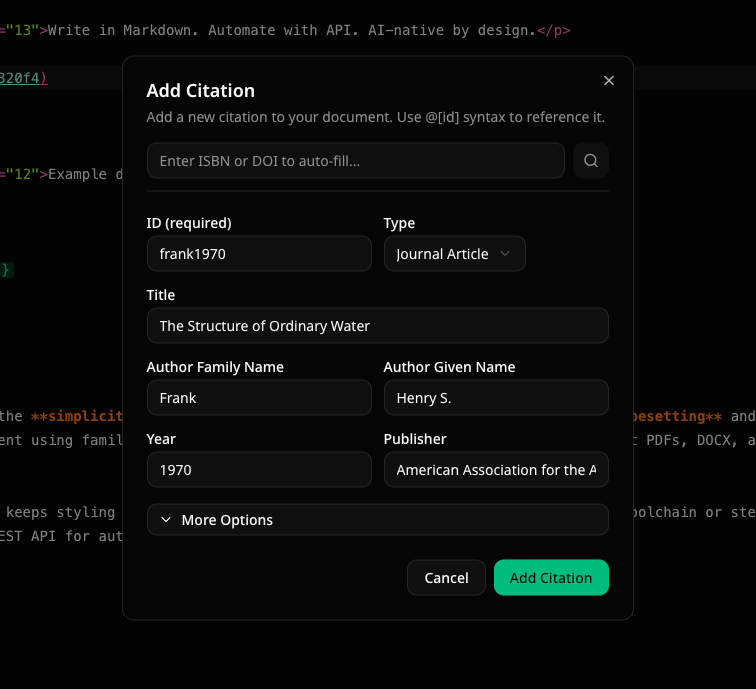
Click the **Add** button to open the citation dialog. There are two ways to fill in the details:
1. **Auto-fill via DOI or ISBN** — enter a DOI (e.g., `10.1000/xyz123`) or ISBN (e.g., `978-3-16-148410-0`) in the lookup bar at the top and press Enter. The citation fields are populated automatically.
2. **Manual entry** — fill in the fields yourself.
***
## Adding a citation
Click the **Add** button to open the citation dialog. There are two ways to fill in the details:
1. **Auto-fill via DOI or ISBN** — enter a DOI (e.g., `10.1000/xyz123`) or ISBN (e.g., `978-3-16-148410-0`) in the lookup bar at the top and press Enter. The citation fields are populated automatically.
2. **Manual entry** — fill in the fields yourself.
 ### Citation fields
Each citation requires an **ID** and a **Type**. All other fields are optional but recommended for proper bibliography formatting.
| Field | Description | Example |
| ------------- | ---------------------------------------- | -------------------------------------------- |
| **ID** | Unique identifier used in `@[id]` syntax | `smith2023` |
| **Type** | Source type | Book, Journal Article, Webpage, Thesis, etc. |
| **Title** | Title of the work | `Introduction to Algorithms` |
| **Author** | Family and given name | `Smith`, `John` |
| **Year** | Publication year | `2023` |
| **Publisher** | Publisher name | `MIT Press` |
Expand **More Options** to access additional fields: Container Title (journal/book), Volume, Issue, Pages, ISBN, ISSN, Edition, Editor, Place of Publication, DOI, and URL.
### Supported source types
| Type | Use for |
| -------------------- | ------------------------------------- |
| **Book** | Monographs, textbooks |
| **Journal Article** | Papers published in academic journals |
| **Book Chapter** | Chapters within edited volumes |
| **Webpage** | Online resources |
| **Thesis** | PhD or master's theses |
| **Report** | Technical reports |
| **Conference Paper** | Papers presented at conferences |
***
## Importing citations
Click the **Import** button to bulk-import citations. The import dialog supports two methods:
### File upload
Upload a **CSL-JSON** (`.json`) or **BibTeX** (`.bib`) file. The parser automatically detects the format.
### Paste text
Switch to the **Paste Text** tab and paste CSL-JSON or BibTeX data directly.
### Citation fields
Each citation requires an **ID** and a **Type**. All other fields are optional but recommended for proper bibliography formatting.
| Field | Description | Example |
| ------------- | ---------------------------------------- | -------------------------------------------- |
| **ID** | Unique identifier used in `@[id]` syntax | `smith2023` |
| **Type** | Source type | Book, Journal Article, Webpage, Thesis, etc. |
| **Title** | Title of the work | `Introduction to Algorithms` |
| **Author** | Family and given name | `Smith`, `John` |
| **Year** | Publication year | `2023` |
| **Publisher** | Publisher name | `MIT Press` |
Expand **More Options** to access additional fields: Container Title (journal/book), Volume, Issue, Pages, ISBN, ISSN, Edition, Editor, Place of Publication, DOI, and URL.
### Supported source types
| Type | Use for |
| -------------------- | ------------------------------------- |
| **Book** | Monographs, textbooks |
| **Journal Article** | Papers published in academic journals |
| **Book Chapter** | Chapters within edited volumes |
| **Webpage** | Online resources |
| **Thesis** | PhD or master's theses |
| **Report** | Technical reports |
| **Conference Paper** | Papers presented at conferences |
***
## Importing citations
Click the **Import** button to bulk-import citations. The import dialog supports two methods:
### File upload
Upload a **CSL-JSON** (`.json`) or **BibTeX** (`.bib`) file. The parser automatically detects the format.
### Paste text
Switch to the **Paste Text** tab and paste CSL-JSON or BibTeX data directly.
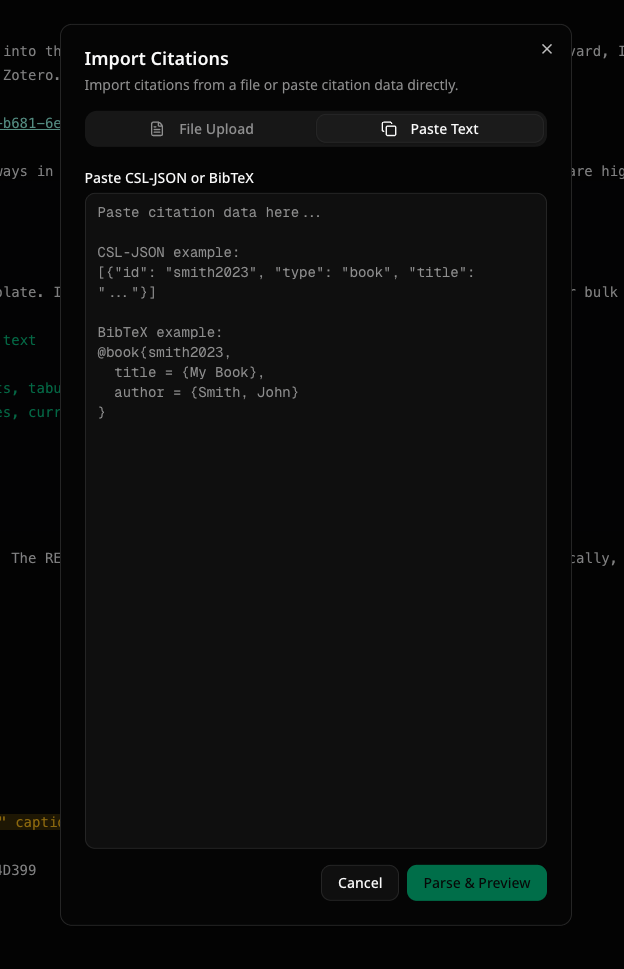 After parsing, a **preview** shows all found citations. You can:
* **Select/deselect** individual citations to import
* **Skip existing citations** (default) or replace them with the imported version
* Review any **errors** (e.g., duplicate IDs within the import file) or **warnings** (e.g., citation already exists in your document)
Most reference managers (Zotero, Mendeley, EndNote, etc.) can export your library as BibTeX or CSL-JSON. This is the fastest way to get your citations into Autype.
***
## Using citations in your document
To reference a citation in your text, use the `@[id]` syntax:
```markdown theme={null}
This has been shown in previous research @[smith2023].
```
After parsing, a **preview** shows all found citations. You can:
* **Select/deselect** individual citations to import
* **Skip existing citations** (default) or replace them with the imported version
* Review any **errors** (e.g., duplicate IDs within the import file) or **warnings** (e.g., citation already exists in your document)
Most reference managers (Zotero, Mendeley, EndNote, etc.) can export your library as BibTeX or CSL-JSON. This is the fastest way to get your citations into Autype.
***
## Using citations in your document
To reference a citation in your text, use the `@[id]` syntax:
```markdown theme={null}
This has been shown in previous research @[smith2023].
```
 You can quickly copy the `@[id]` syntax for any citation by hovering over it in the panel and clicking the **copy** button.
### Citations with locators
Add page numbers, chapters, or other locators after the cite key:
```markdown theme={null}
@[smith2023, p. 42]
@[smith2023, pp. 42-45]
@[smith2023, ch. 3]
@[smith2023, sec. 2.1]
@[smith2023, vol. 2]
```
**Supported locator prefixes:**
| Prefix | Description |
| ------ | -------------- |
| `p.` | Single page |
| `pp.` | Page range |
| `ch.` | Chapter number |
| `sec.` | Section number |
| `vol.` | Volume number |
Multiple locators can be combined:
```markdown theme={null}
@[smith2023, vol. 2, pp. 42-45]
@[smith2023, ch. 3, p. 15]
```
### Adding notes
Add a custom note to a citation:
```markdown theme={null}
@[smith2023, p. 42, note="emphasis added"]
@[jones2022, note="translated by the author"]
```
### Author control
**Suppress author** — prefix the cite key with `-` when the author is already mentioned in the text:
```markdown theme={null}
Smith @[-smith2023, p. 42] showed that...
```
This renders as: Smith (2023, p. 42) instead of Smith (Smith, 2023, p. 42).
**Author only (narrative mode)** — append `!` to the cite key to show only the author name:
```markdown theme={null}
@[smith2023!] showed that the effect is significant @[smith2023, p. 42].
```
This renders as: Smith showed that the effect is significant (Smith, 2023, p. 42).
***
## Citation style
The citation style determines how in-text citations and the bibliography are formatted. You can change the style in the **Styles** panel under the document defaults section.
You can quickly copy the `@[id]` syntax for any citation by hovering over it in the panel and clicking the **copy** button.
### Citations with locators
Add page numbers, chapters, or other locators after the cite key:
```markdown theme={null}
@[smith2023, p. 42]
@[smith2023, pp. 42-45]
@[smith2023, ch. 3]
@[smith2023, sec. 2.1]
@[smith2023, vol. 2]
```
**Supported locator prefixes:**
| Prefix | Description |
| ------ | -------------- |
| `p.` | Single page |
| `pp.` | Page range |
| `ch.` | Chapter number |
| `sec.` | Section number |
| `vol.` | Volume number |
Multiple locators can be combined:
```markdown theme={null}
@[smith2023, vol. 2, pp. 42-45]
@[smith2023, ch. 3, p. 15]
```
### Adding notes
Add a custom note to a citation:
```markdown theme={null}
@[smith2023, p. 42, note="emphasis added"]
@[jones2022, note="translated by the author"]
```
### Author control
**Suppress author** — prefix the cite key with `-` when the author is already mentioned in the text:
```markdown theme={null}
Smith @[-smith2023, p. 42] showed that...
```
This renders as: Smith (2023, p. 42) instead of Smith (Smith, 2023, p. 42).
**Author only (narrative mode)** — append `!` to the cite key to show only the author name:
```markdown theme={null}
@[smith2023!] showed that the effect is significant @[smith2023, p. 42].
```
This renders as: Smith showed that the effect is significant (Smith, 2023, p. 42).
***
## Citation style
The citation style determines how in-text citations and the bibliography are formatted. You can change the style in the **Styles** panel under the document defaults section.
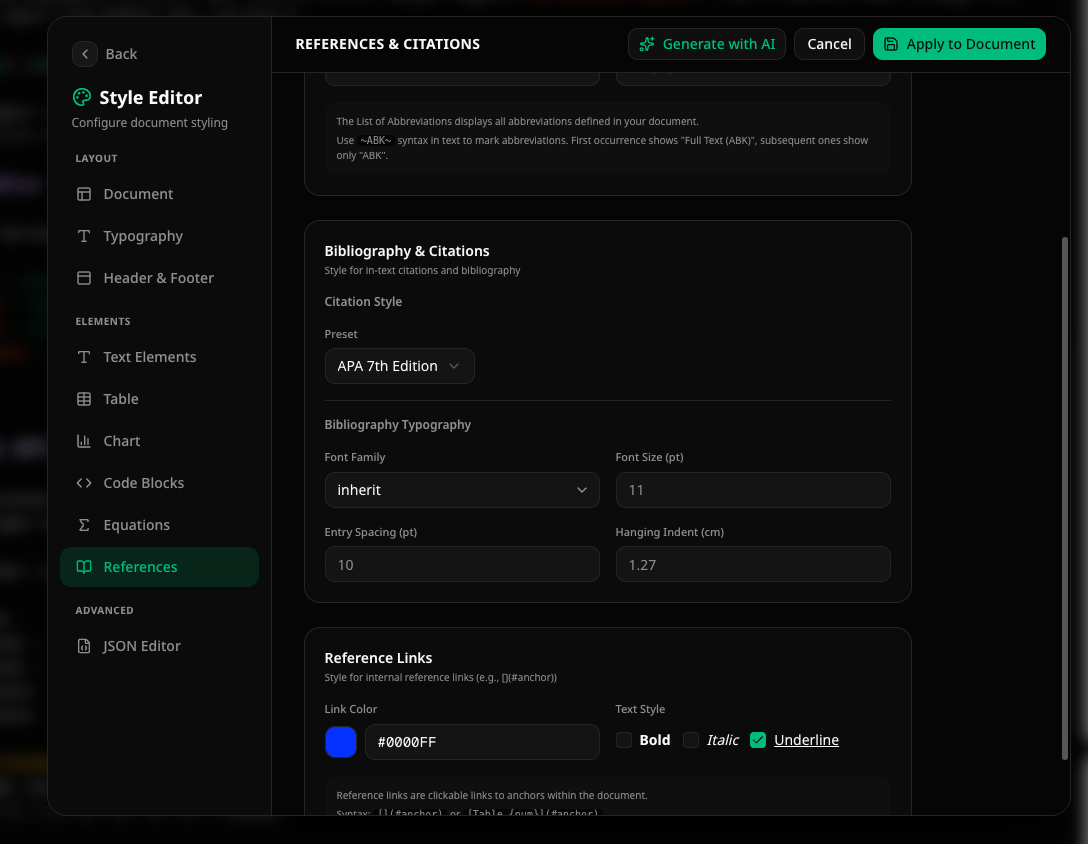 **Available presets:**
| Preset | Style |
| ------------- | --------------------------------------------------------- |
| **APA 7** | American Psychological Association, 7th edition (default) |
| **Harvard** | Author-date style commonly used in the UK |
| **IEEE** | Numbered style used in engineering and computer science |
| **Chicago** | Chicago Manual of Style |
| **MLA** | Modern Language Association |
| **Vancouver** | Numbered style used in biomedical sciences |
***
## Bibliography
To insert an automatic bibliography that lists all cited sources, use the **Indices** button in the [toolbar](/getting-started/editor/editor-overview#toolbar) and select **Bibliography**.
The directive syntax is:
```markdown theme={null}
::bibliography{title="References"}
```
**Short aliases:**
```markdown theme={null}
::bib{title="References"}
::references{title="Literaturverzeichnis"}
```
The bibliography collects all cited sources and formats them according to the configured citation style.
| Attribute | Values | Description |
| --------- | ------ | -------------------------------------- |
| `title` | String | Title displayed above the bibliography |
The bibliography only includes sources that are actually **cited** in the document using `@[id]`. Sources that are defined in the panel but never referenced are not included.
**Available presets:**
| Preset | Style |
| ------------- | --------------------------------------------------------- |
| **APA 7** | American Psychological Association, 7th edition (default) |
| **Harvard** | Author-date style commonly used in the UK |
| **IEEE** | Numbered style used in engineering and computer science |
| **Chicago** | Chicago Manual of Style |
| **MLA** | Modern Language Association |
| **Vancouver** | Numbered style used in biomedical sciences |
***
## Bibliography
To insert an automatic bibliography that lists all cited sources, use the **Indices** button in the [toolbar](/getting-started/editor/editor-overview#toolbar) and select **Bibliography**.
The directive syntax is:
```markdown theme={null}
::bibliography{title="References"}
```
**Short aliases:**
```markdown theme={null}
::bib{title="References"}
::references{title="Literaturverzeichnis"}
```
The bibliography collects all cited sources and formats them according to the configured citation style.
| Attribute | Values | Description |
| --------- | ------ | -------------------------------------- |
| `title` | String | Title displayed above the bibliography |
The bibliography only includes sources that are actually **cited** in the document using `@[id]`. Sources that are defined in the panel but never referenced are not included.